• QR Codes: Ultimate Convenience or Cyber Threat?

    QR codes are everywhere now — restaurant tables, parking meters, posters, emails, even product packaging. They make life easier, but that same convenience has created a security blind spot most people don’t think twice about.

    What is a QR code?

    A QR code is essentially a souped-up barcode. A standard 1D barcode stores data along a single line — usually a short string of numbers. A QR code stores data in a two-dimensional grid, which lets it hold thousands of characters instead of a dozen.
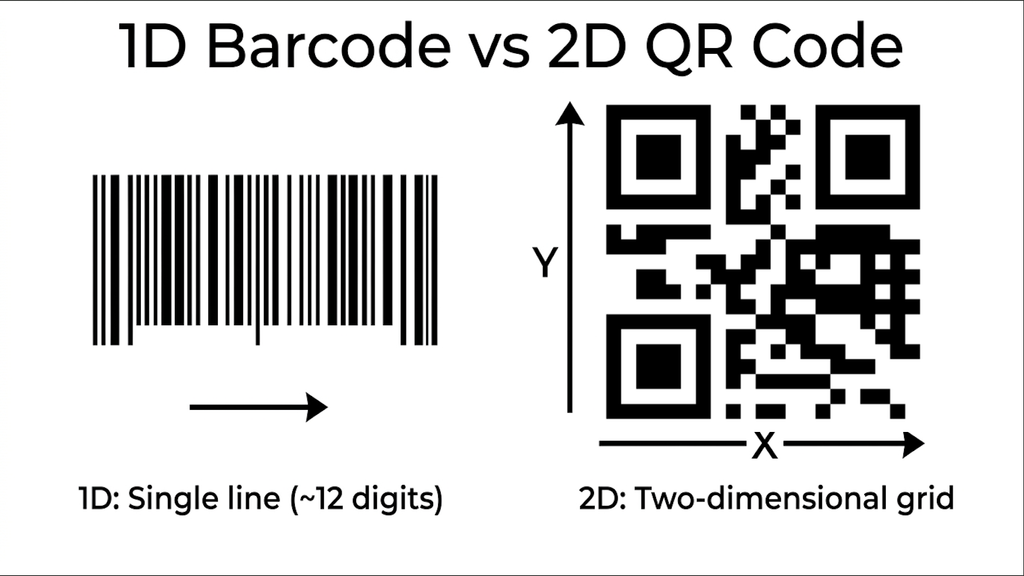
    barcode vs qr code
    QR code pointing to https://dainys.lt

    The most common use is encoding a web address: point your camera at the grid, and your phone decodes it and offers to open the link. That’s also exactly what makes QR codes useful to attackers — people trust the scan-and-go experience and rarely scrutinise what they’re about to open.

    Key risks to watch for

    Physical tampering (sticker overlays). Someone prints a malicious QR code on a sticker and places it directly over a legitimate one — on a parking kiosk, a flyer, or a restaurant table tent. Scanning it sends you to a cloned site built to capture login credentials or payment details, often while still showing the restaurant’s real logo and menu so nothing looks obviously wrong.

    Obscured destinations. Because the raw URL encoded in a QR code is often long, codes frequently point through a shortener or a redirect service. That’s normal — but it also means your phone’s preview may only show a shortened link (bit.ly/xyz123) instead of the actual destination. Attackers exploit this ambiguity deliberately, since a shortened link gives you nothing to visually verify before you tap it. (Legitimate businesses use dynamic QR codes too, for things like updating a menu URL without reprinting the code — the risk isn’t the dynamic link itself, it’s that you can’t tell a legitimate one from a malicious one just by looking.)

    “Quishing” via email and print. The same social-engineering tactics used in phishing emails now show up as QR codes embedded in emails, flyers, or fake delivery notices — bypassing email security tools that scan for malicious links in text, since the URL is hidden inside an image.

    How to protect yourself

    1. Check for physical tampering. Before scanning a QR code in public — parking meters are a favorite target — look and feel for a sticker that’s been placed over the original.
    2. Read the full URL before tapping. Most phone camera apps show a preview of the destination. Check that it matches the organisation you expect, not just that something loaded.
    3. Don’t enter sensitive info on a page you reached by scanning. If a QR code leads to a login or payment page, consider navigating to the organization’s site directly instead, especially for anything involving money.
    4. Keep 2FA enabled everywhere. If credentials do get phished, a second factor is often the difference between a close call and an actual account takeover.
    5. Treat QR codes in emails and texts like any other unsolicited link. If you weren’t expecting it, don’t scan it — verify through another channel first.

    Stay safe
  • The Parking Fine That Wasn’t: How a Single Text Almost Got Me

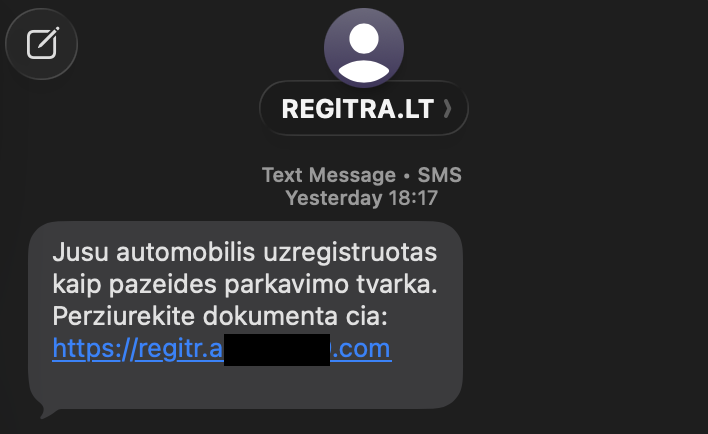
    Over the weekend I left my car in an unusual spot. A few hours later my phone buzzed with a text from “Regitra”:

    “Jūsų automobilis užregistruotas kaip pažeidęs parkavimo tvarką. Peržiūrėkite dokumentą čia: [link]”

    screenshot 2026 10 05 at 08.10.15

    (Your vehicle has been registered as violating parking rules. View the document here.)

    My heart rate jumped. For a second, I believed it. I had parked somewhere odd, so the message fit my situation perfectly.

    Then I looked at the link and remembered what Regitra actually does: vehicle registration and driver’s licences. Parking fines aren’t their job. They come from the police or municipal authorities. The domain was also a jumble of characters, nothing like an official address. I deleted the message and moved on.

    The timing was pure coincidence, but that’s exactly why it’s worth writing about.

    Why it almost worked

    Scammers don’t need to be clever. They need to land a message at a moment when you’re primed to believe it. This one used three levers:

    • Authority: a name you recognise and trust, in this case a state institution.
    • Context: a plausible reason to be contacted. Most of us drive, and most of us have parked badly at some point.
    • Urgency and fear: a fine implies a deadline, a penalty and a mistake you’ve made.

    When all three line up, your brain reacts before it analyses. The emotional jolt comes first, and the rational check (“wait, does Regitra even do this?”) comes second, if at all. Scammers are counting on you to tap before the second step.

    How these scams work behind the scenes

    This type of attack is called smishing, which is phishing by SMS.

    Here’s the typical chain:

    • Mass sending. Criminals send thousands or millions of texts to numbers they’ve bought, scraped or simply generated. They don’t know who owns a car or where it’s parked. Some people will always happen to match, and that’s all they need.
    • A lookalike link. The URL imitates a real institution with extra characters, a different domain ending, or random numbers. On a phone screen, where the address is truncated, it’s easy to miss.
    • A fake page. The link opens a convincing copy of an official site or payment portal. It may ask you to “confirm the fine”, log in with your bank or e-government credentials, or enter card details to pay a small amount.
    • Data harvesting. Whatever you type goes straight to the attacker. Some pages also ask for the one-time code your bank sends, which lets the criminal approve a transaction in real time while you think you’re paying a €15 fine.

    Some of these messages can even appear in the same thread as genuine messages from the real sender, because SMS sender names can be spoofed. A familiar sender name is not proof.

    What the consequences can be

    • A small “fine” can be the entry point to something much bigger:
    • Direct financial loss: drained bank accounts or unauthorised card payments, sometimes within minutes.
    • Identity theft: names, ID numbers, addresses and vehicle details are enough to open accounts or run further scams in your name.
    • Account takeover: if you reuse passwords, one stolen login can unlock your email, social media and online shopping.
    • Malware: some links install malicious apps or prompt you to grant permissions that give attackers access to your phone.
    • Follow-up attacks: once you’ve engaged, you may be flagged as a “responsive” target and hit with more convincing scams, such as a fake call from “your bank’s fraud department”.
      What to do instead

    Before you click:

    Ask whether this organisation actually handles this matter. Regitra deals with registration and licences, not parking enforcement.


    Never trust the link. Open the official website by typing the address yourself, or use the official app, and check for any real fine there.


    Look at the domain character by character. Extra numbers, odd spellings and unfamiliar endings are red flags.

    Be suspicious of any message that creates pressure to act immediately.

    If you’ve already clicked or entered details:

    1. Call your bank right away. Block your cards and ask them to review recent transactions. Speed matters most here.
    2. Change your passwords for any account you entered, and for any other account that uses the same password. Turn on multi-factor authentication.
    3. Check your phone. If you installed anything or granted permissions, remove the app and consider running a security scan.
    4. Report it. Tell the police and your national cybersecurity authority (in Lithuania, the National Cyber Security Centre). The real institution being impersonated often wants to know too, as it helps them warn others.
    5. Watch for follow-ups. Expect suspicious calls or messages in the following days and treat them with extra caution.
      The takeaway

    I didn’t avoid this because I’m especially savvy. For a moment, my pulse went up like anyone’s would. What saved me was a habit: pause, then ask who actually handles this and where the link really goes.

    Scammers rely on speed. A five-second pause is one of the strongest defences you have, so build it into the way you read messages.

    Share this with someone who might tap before they think. And if you’ve had a close call yourself, I’d like to hear about it in the comments.